5. Mixing Experiments
The experiments with Mistura are a special type of experiment in which the factors are ingredients or components of a mixture.
Example:
The aim is to reduce the number of mites on a plant. To this end, four types of pesticides, as well as a mixture of them, were sprayed on the plant to analyze the quantity. In the table, xi represents the percentage of pesticide i used in the study, for i=1,2,3,4.
| X1 | X2 | X3 | X4 | Y |
|---|---|---|---|---|
| 1 | 0 | 0 | 0 | 1.8 |
| 0 | 1 | 0 | 0 | 25.4 |
| 0 | 0 | 1 | 0 | 28.6 |
| 0 | 0 | 0 | 1 | 38.5 |
| 0.5 | 0.5 | 0 | 0 | 4.9 |
| 0.5 | 0 | 0.5 | 0 | 3.1 |
| 0.5 | 0 | 0 | 0.5 | 28.7 |
| 0 | 0.5 | 0.5 | 0 | 3.4 |
| 0 | 0.5 | 0 | 0.5 | 37.4 |
| 0 | 0 | 0.5 | 0.5 | 10.7 |
| 0.33 | 0.33 | 0.33 | 0 | 22 |
| 0.33 | 0.33 | 0 | 0.33 | 2.6 |
| 0.33 | 0 | 0.33 | 0.33 | 2.4 |
| 0 | 0.33 | 0.33 | 0.33 | 11.1 |
| 0.25 | 0.25 | 0.25 | 0.25 | 0.8 |
We will upload the data to the system.
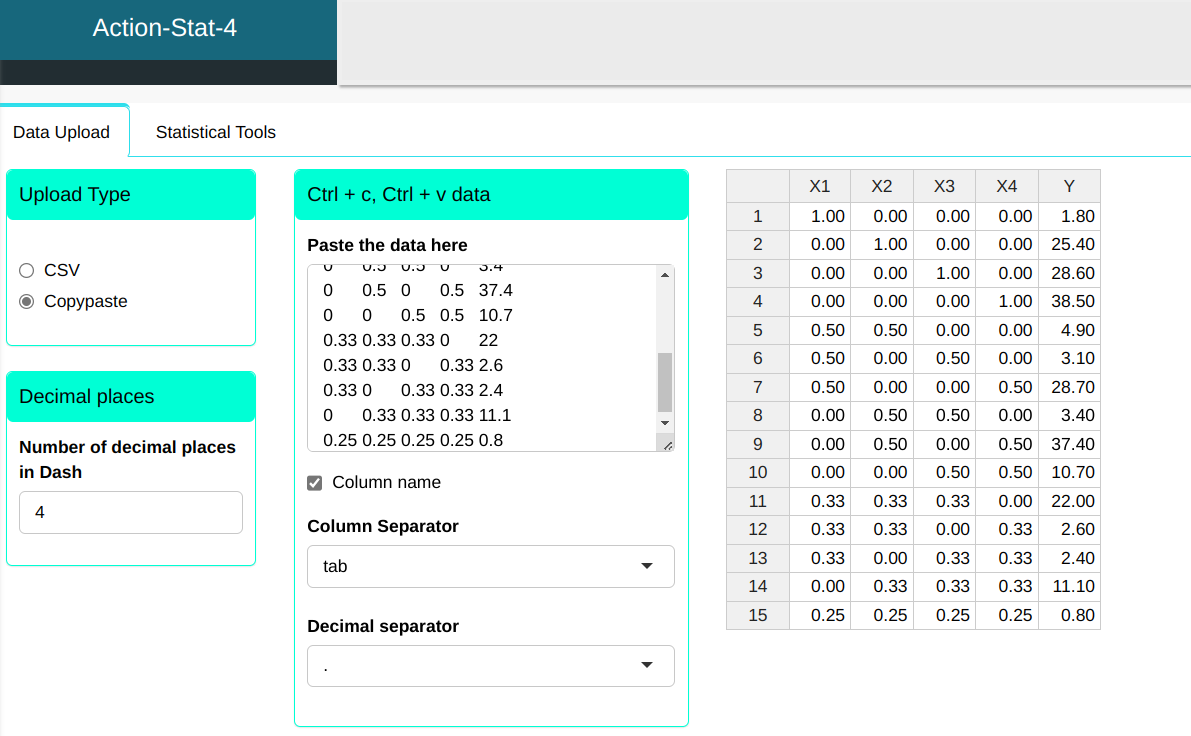
Configure as shown in the figure below to realize the analysis.
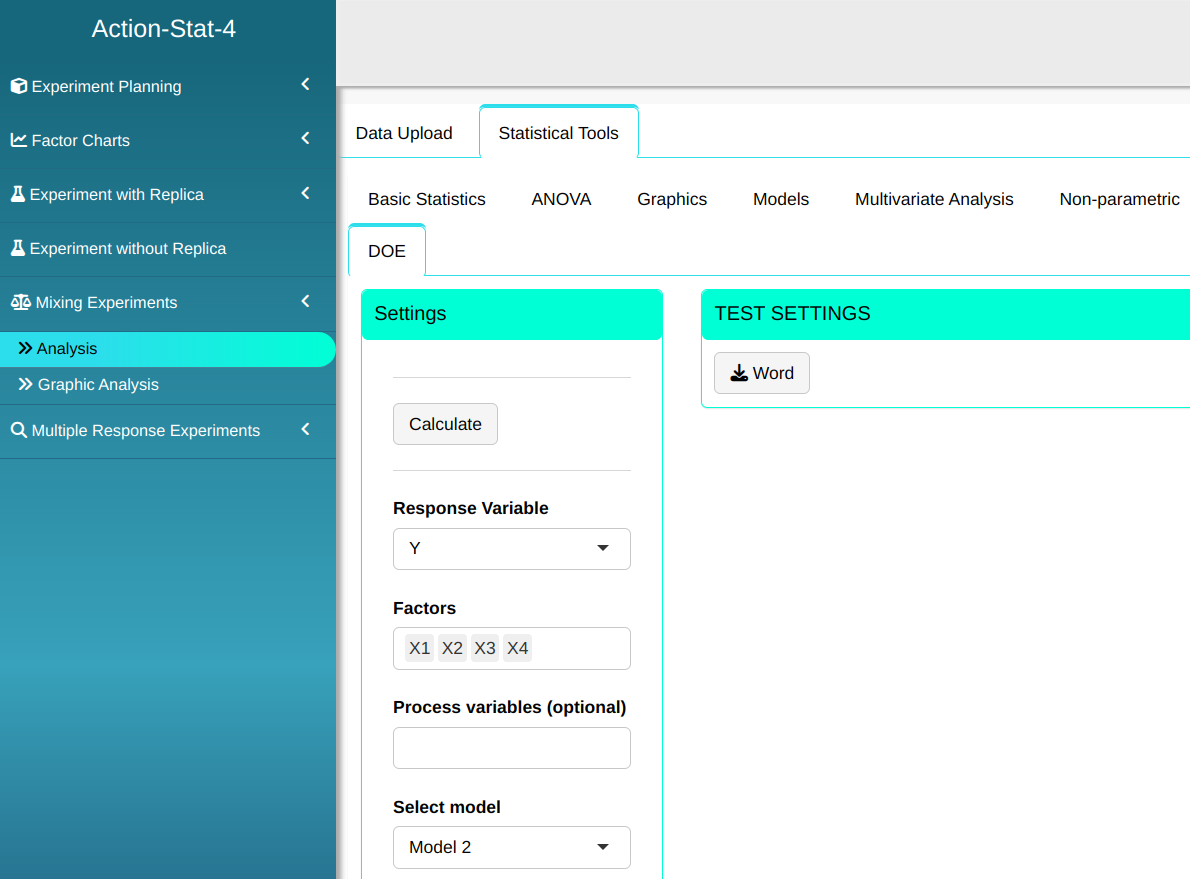

Then click Calculate we obtain the results. You can also generate the analyses and download them in Word format.

The results are
ANOVA table
| D.F. | Sum of Square | Mean Square | F Stat. | P-value | |
|---|---|---|---|---|---|
| x1 | 1 | 400.219 | 400.219 | 2.461 | 0.177 |
| x2 | 1 | 1397.90 | 1397.90 | 8.596 | 0.033 |
| x3 | 1 | 509.221 | 509.221 | 3.131 | 0.137 |
| x4 | 1 | 1883.91 | 1883.91 | 11.584 | 0.019 |
| x1:x2 | 1 | 56.413 | 56.413 | 0.347 | 0.581 |
| x1:x3 | 1 | 26.98 | 26.98 | 0.166 | 0.701 |
| x1:x4 | 1 | 2.001 | 2.001 | 0.012 | 0.916 |
| x2:x3 | 1 | 205.057 | 205.057 | 1.261 | 0.312 |
| x2:x4 | 1 | 3.108 | 3.108 | 0.019 | 0.895 |
| x3:x4 | 1 | 653.163 | 653.163 | 4.016 | 0.101 |
| Residuals | 5 | 813.132 | 162.626 |
Coefficients
| Estimate | Standard Deviation | t Stat. | P-value | |
|---|---|---|---|---|
| x1 | 2.652 | 12.613 | 0.21 | 0.842 |
| x2 | 25.7 | 12.613 | 2.038 | 0.097 |
| x3 | 27.947 | 12.613 | 2.216 | 0.078 |
| x4 | 41.212 | 12.613 | 3.267 | 0.022 |
| x1:x2 | -35.951 | 54.551 | -0.659 | 0.539 |
| x1:x3 | -31.917 | 54.551 | -0.585 | 0.584 |
| x1:x4 | -11.573 | 54.551 | -0.212 | 0.84 |
| x2:x3 | -67.701 | 54.551 | -1.241 | 0.27 |
| x2:x4 | -13.758 | 54.551 | -0.252 | 0.811 |
| x3:x4 | -109.324 | 54.551 | -2.004 | 0.101 |
Descriptive measure for Goodness-of-Fit
| Standard Deviation of residuals | Degrees of Freedom | $\text{R}^2$ | Adjusted $\text{R}^2$ |
|---|---|---|---|
| 12.753 | 5 | 0.863 | 0.59 |
Summary of Residual analysis
| N.Obs | x1 | x2 | x3 | x4 | Residuals | Studentized Residuals | Standardized Residuals | Leverage | DFFITS | DFBETA | D-COOK |
|---|---|---|---|---|---|---|---|---|---|---|---|
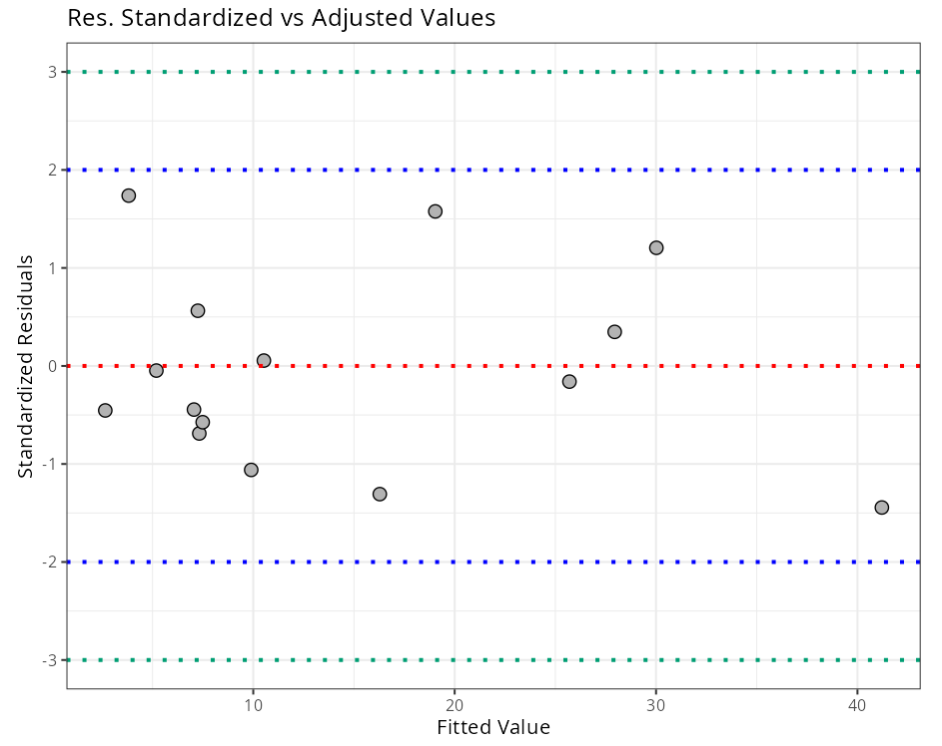
| 1 | 1 | 0 | 0 | 0 | -0.852 | -0.415 | -0.454 | 0.978 | -2.784 | 0.039 | 0.929 |
| 2 | 0 | 1 | 0 | 0 | -0.3 | -0.143 | -0.16 | 0.978 | -0.963 | -0.963 | 0.115 |
| 3 | 0 | 0 | 1 | 0 | 0.653 | 0.315 | 0.348 | 0.978 | 2.114 | -0.03 | 0.545 |
| 4 | 0 | 0 | 0 | 1 | -2.712 | -1.692 | -1.444 | 0.978 | -11.362 | 0.159 | 9.406 |
| 5 | 0.5 | 0.5 | 0 | 0 | -0.289 | -0.042 | -0.047 | 0.769 | -0.077 | -0.005 | 0.001 |
| 6 | 0.5 | 0 | 0.5 | 0 | -4.221 | -0.648 | -0.689 | 0.769 | -1.182 | -0.028 | 0.158 |
| 7 | 0.5 | 0 | 0 | 0.5 | 9.661 | 1.989 | 1.577 | 0.769 | 3.631 | 0.087 | 0.828 |
| 8 | 0 | 0.5 | 0.5 | 0 | -6.498 | -1.078 | -1.061 | 0.769 | -1.967 | -0.122 | 0.375 |
| 9 | 0 | 0.5 | 0 | 0.5 | 7.383 | 1.279 | 1.205 | 0.769 | 2.336 | 0.145 | 0.484 |
| 10 | 0 | 0 | 0.5 | 0.5 | 3.451 | 0.521 | 0.563 | 0.769 | 0.95 | 0.023 | 0.106 |
| 11 | 0.33 | 0.33 | 0.33 | 0 | 18.185 | 2.47 | 1.738 | 0.327 | 1.72 | -0.135 | 0.147 |
| 12 | 0.33 | 0.33 | 0 | 0.33 | -13.683 | -1.442 | -1.308 | 0.327 | -1.004 | 0.079 | 0.083 |
| 13 | 0.33 | 0 | 0.33 | 0.33 | -4.656 | -0.406 | -0.445 | 0.327 | -0.283 | -0.016 | 0.01 |
| 14 | 0 | 0.33 | 0.33 | 0.33 | 0.573 | 0.049 | 0.055 | 0.327 | 0.034 | -0.003 | 0 |
| 15 | 0.25 | 0.25 | 0.25 | 0.25 | -6.689 | -0.531 | -0.574 | 0.165 | -0.236 | 0.036 | 0.007 |
Criterion
| Diagnostic | Formula | Value |
|---|---|---|
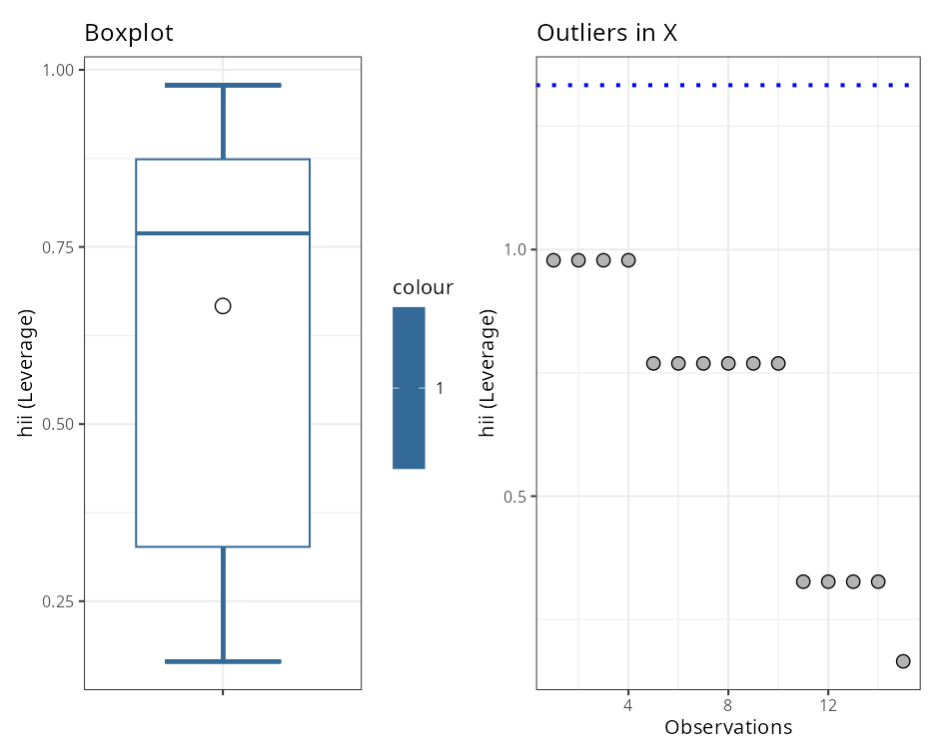
| hii (Leverage) | (2*(p+1))/n | 1.300 |
| DFFITS | 2* raíz ((p+1)/n) | 1.600 |
| DCOOK | 4/n | 0.267 |
| DFBETA | 2/raíz(n) | 0.520 |
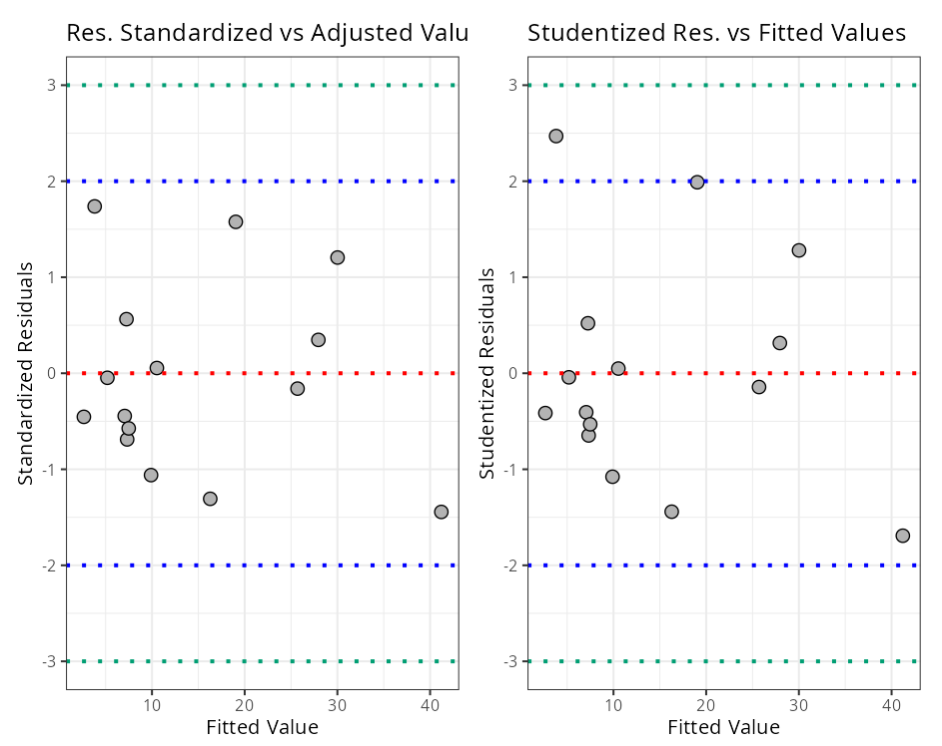
| Standardized Residuals | (-3,3) | 3.000 |
| Student-ized Residuals | (-3,3) | 3.000 |
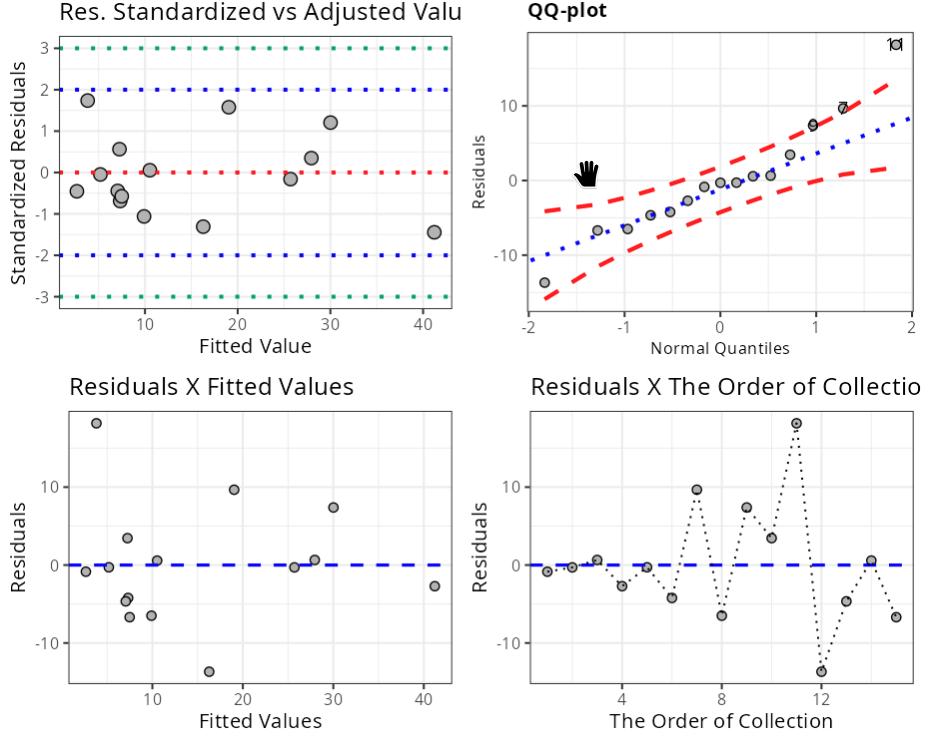
Normality Test
| Statistic | P-value | |
|---|---|---|
| Anderson-Darling | 0.402 | 0.315 |
| Shapiro-Wilk | 0.949 | 0.505 |
| Kolmogorov-Smirnov | 0.199 | 0.112 |
| Ryan-Joiner | 0.966 | 0.253 |
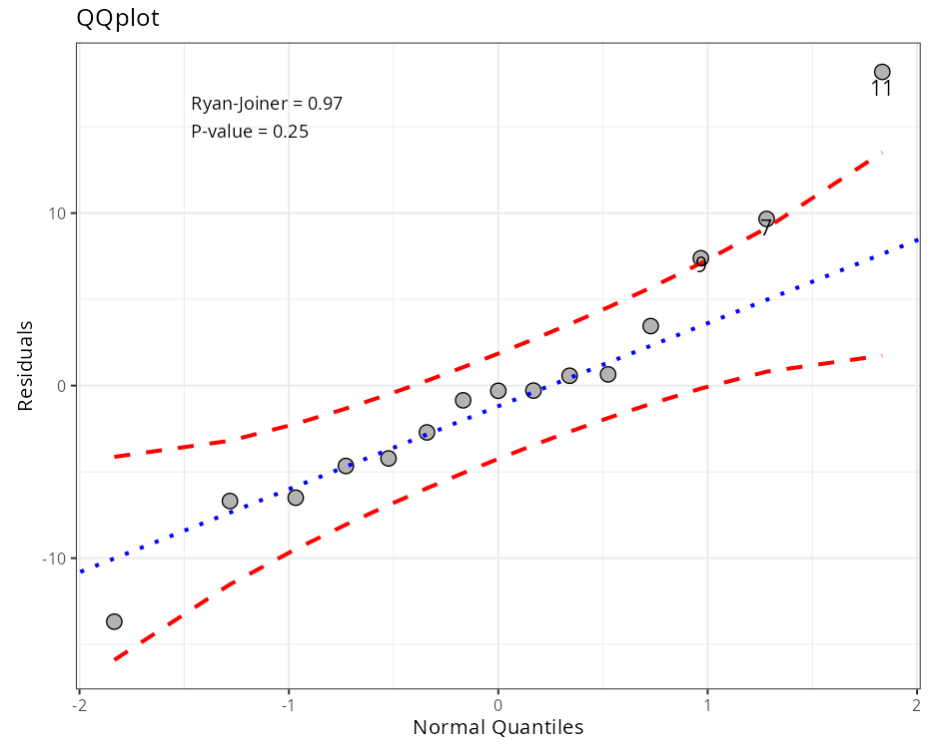
Outliers (Quantiles)
| Obs. | Normal Quantiles | Residuals | Criterion |
|---|---|---|---|
| 9 | 0.97 | 7.38 | Envelope (Confidence Level =0.95) |
| 7 | 1.28 | 9.66 | Envelope (Confidence Level =0.95) |
| 11 | 1.83 | 18.18 | Envelope (Confidence Level =0.95) |
Homoscedasticity Test - Breusch Pagan
| Statistic | DF | P-value |
|---|---|---|
| 0.551 | 1 | 0.458 |
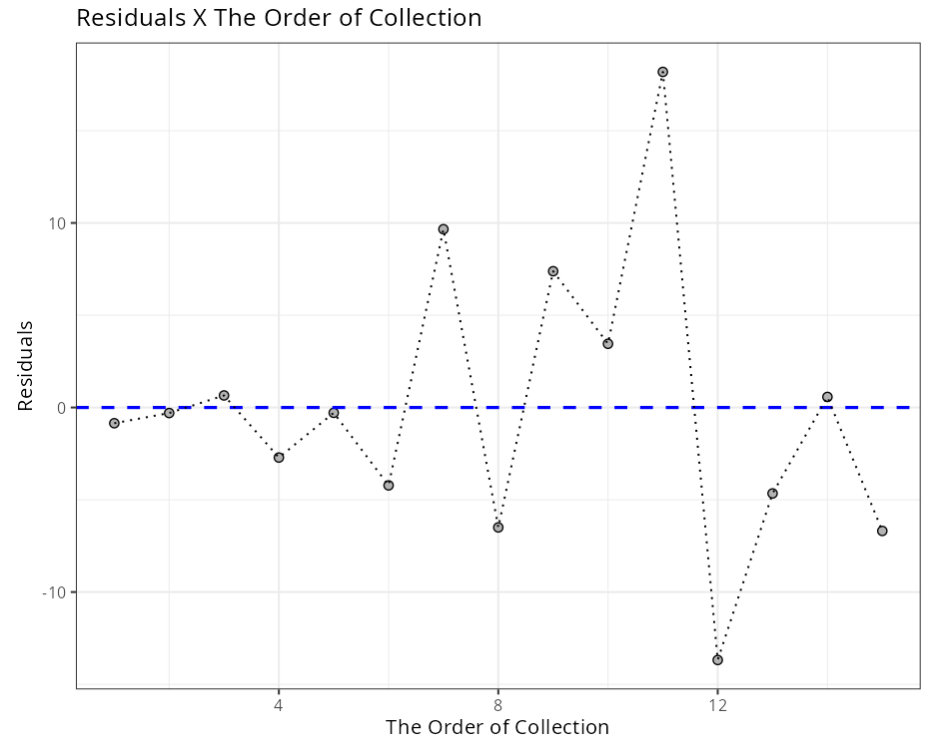
Independence Test - Durbin-Watson
| Statistic | P-value |
|---|---|
| 2.57 | 0.269 |
| Lack of Fit Test | ||
| Input data do not contain replicas. |
Outliers (atypical points)
| Observation | T-Value | P-value | P-value Bonferroni |
|---|---|---|---|
| 11 | 2.47 | 0.069 | 1 |
Influential Points
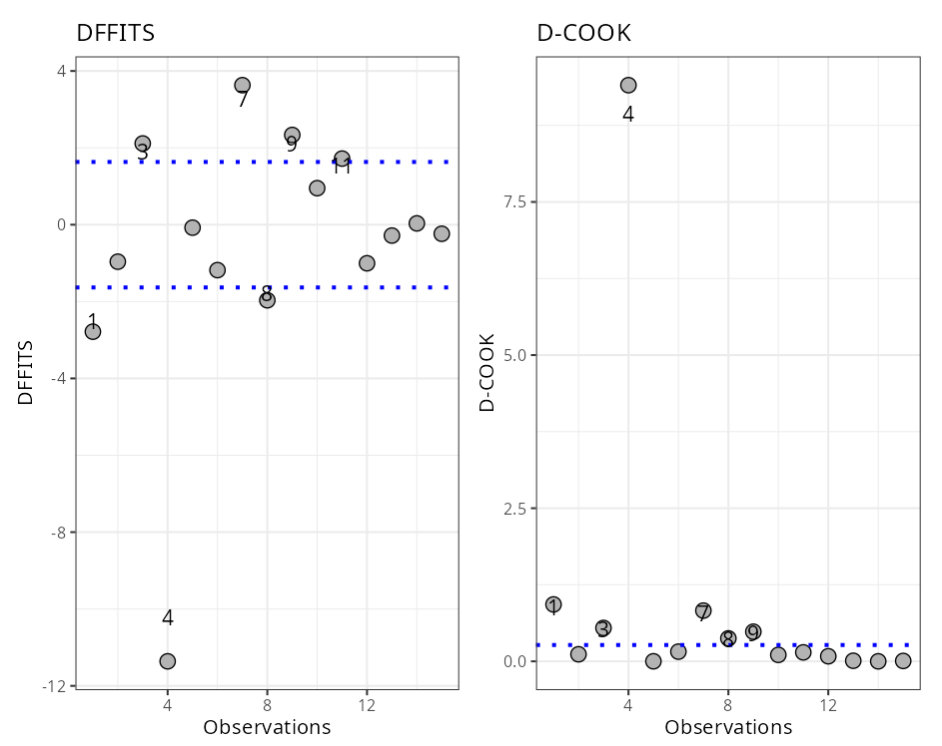
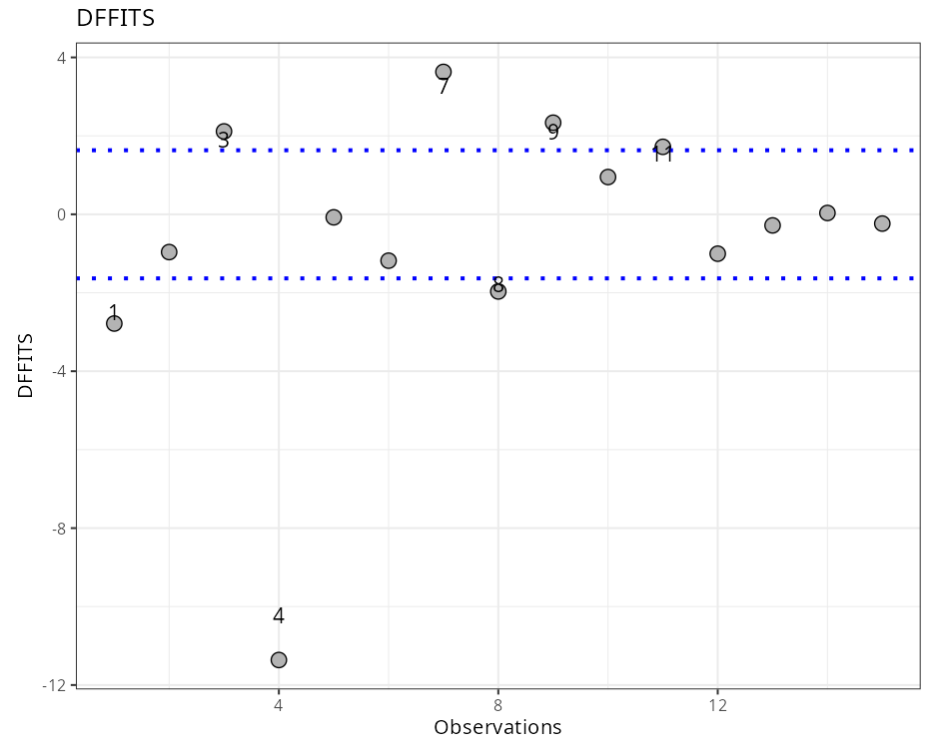
| Observations | DFFITS | Criterion |
|---|---|---|
| 1 | -2.78 | ± 1.63 |
| 3 | 2.11 | ± 1.63 |
| 4 | -11.36 | ± 1.63 |
| 7 | 3.63 | ± 1.63 |
| 8 | -1.97 | ± 1.63 |
| 9 | 2.34 | ± 1.63 |
| 11 | 1.72 | ± 1.63 |
Influential Points
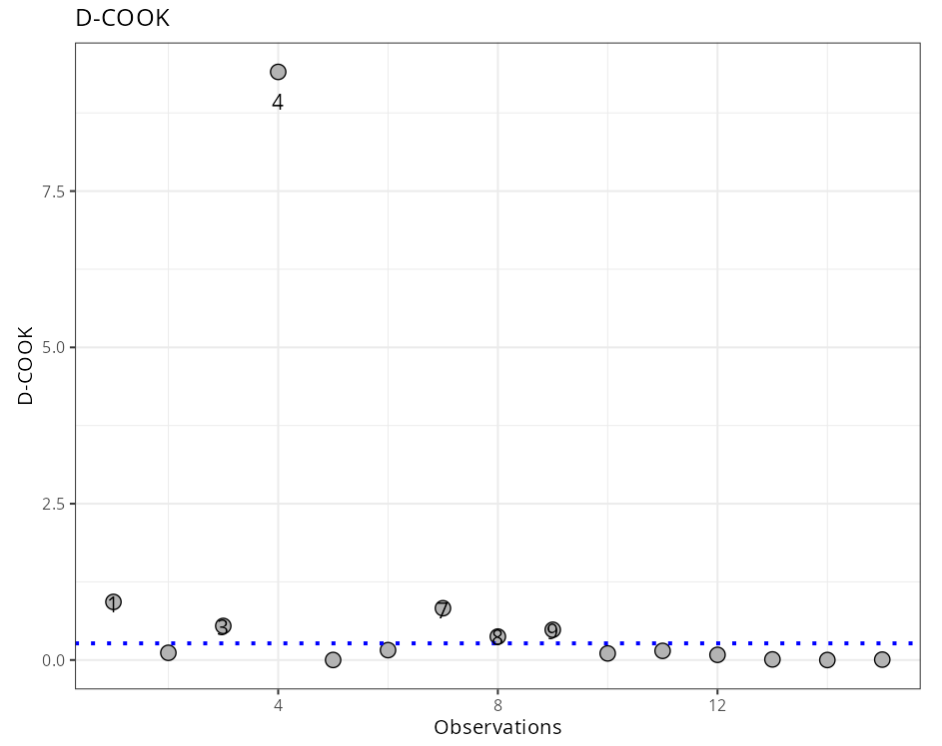
| Observations | DCOOK | Criterion |
|---|---|---|
| 1 | 0.929 | 0.267 |
| 3 | 0.545 | 0.267 |
| 4 | 9.406 | 0.267 |
| 7 | 0.828 | 0.267 |
| 8 | 0.375 | 0.267 |
| 9 | 0.484 | 0.267 |
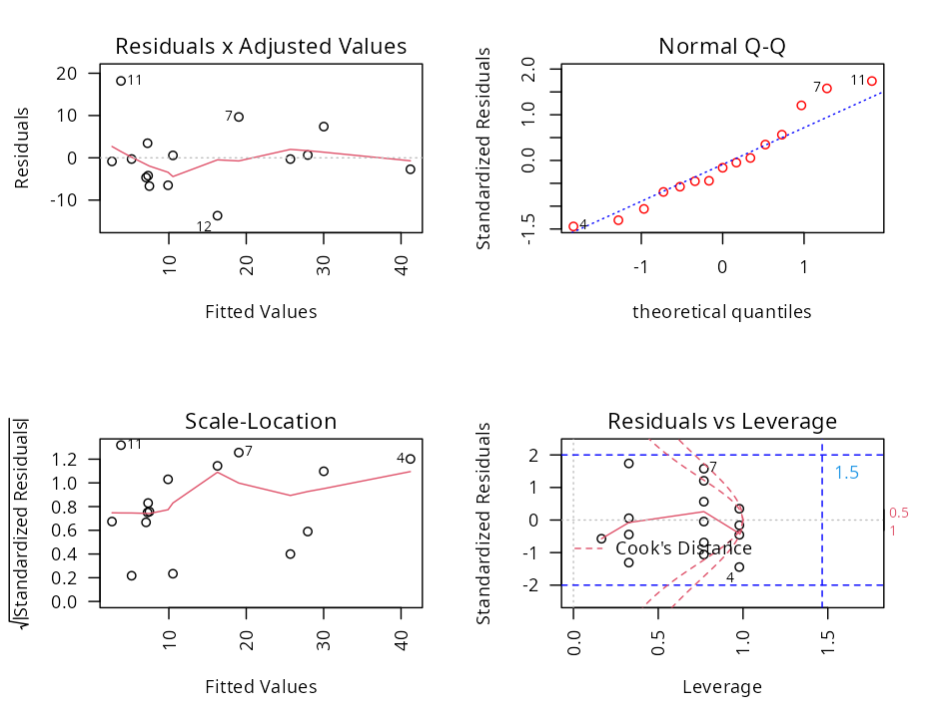
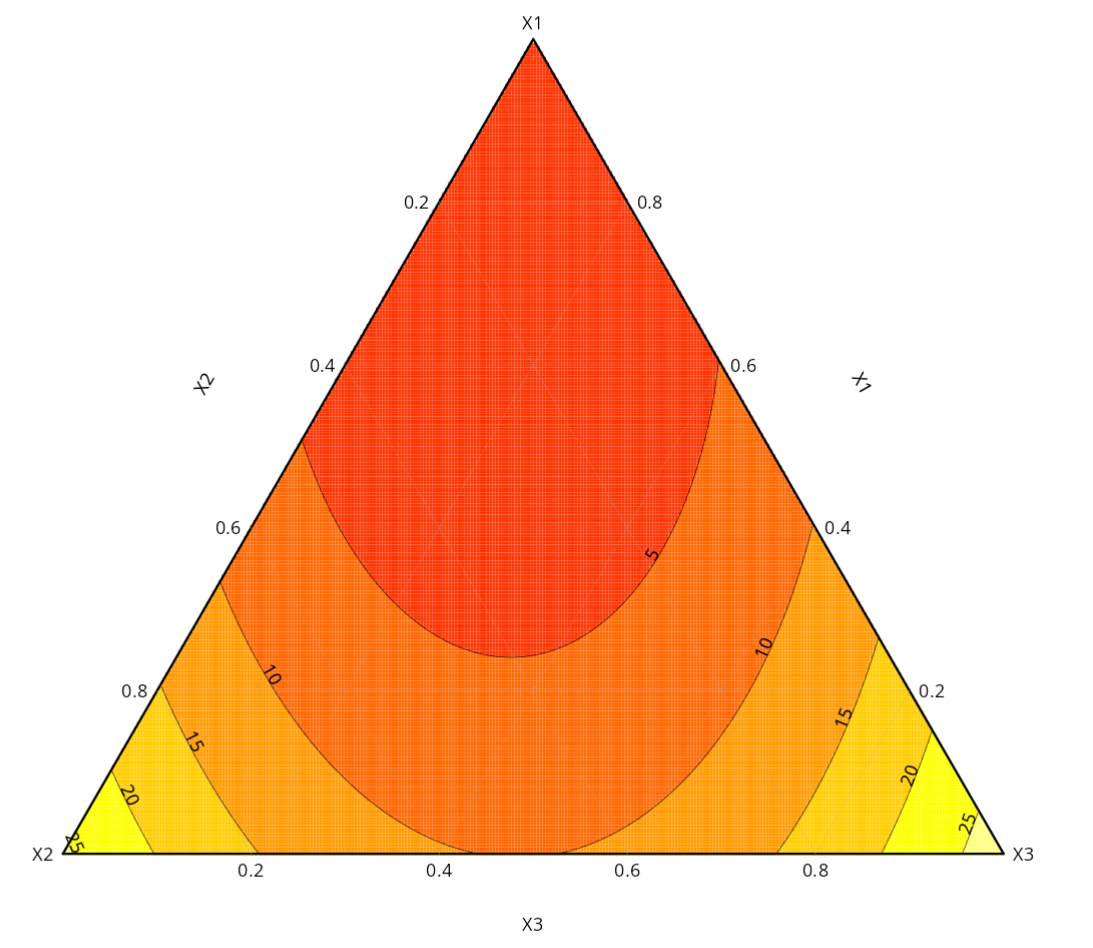
With the calculated results, we can make a graphical analysis.
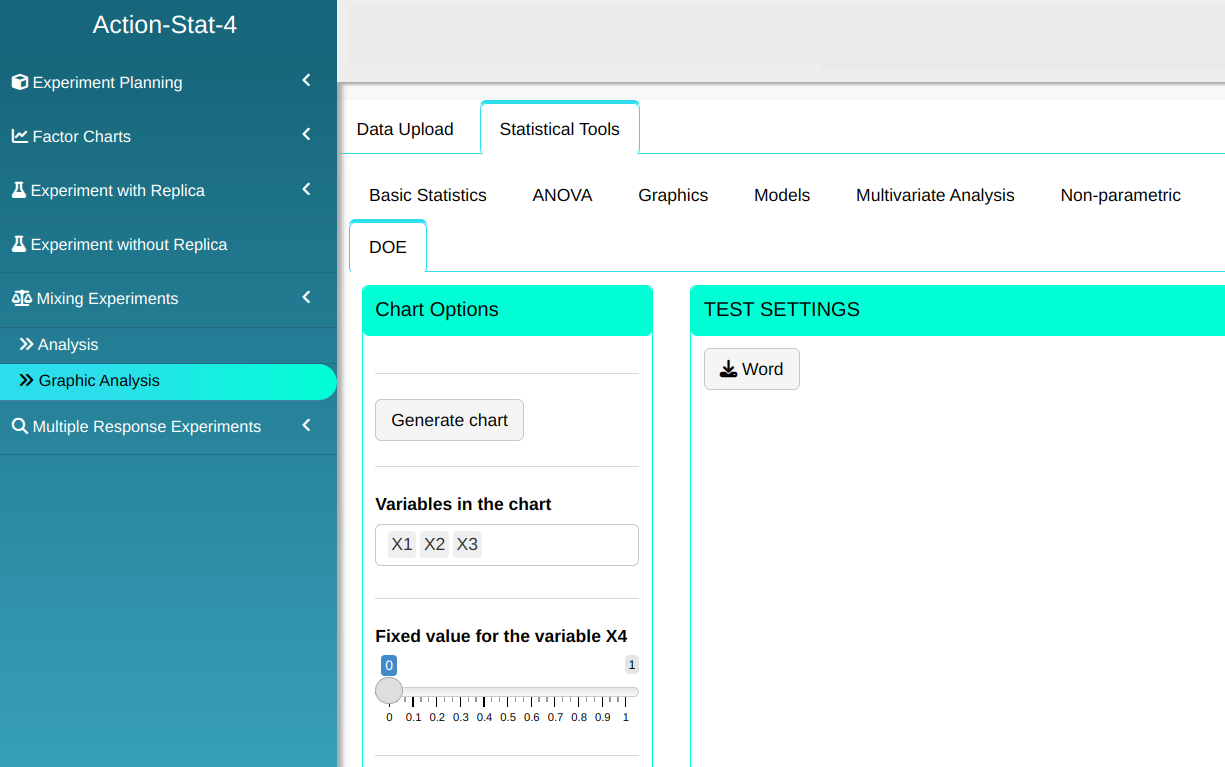
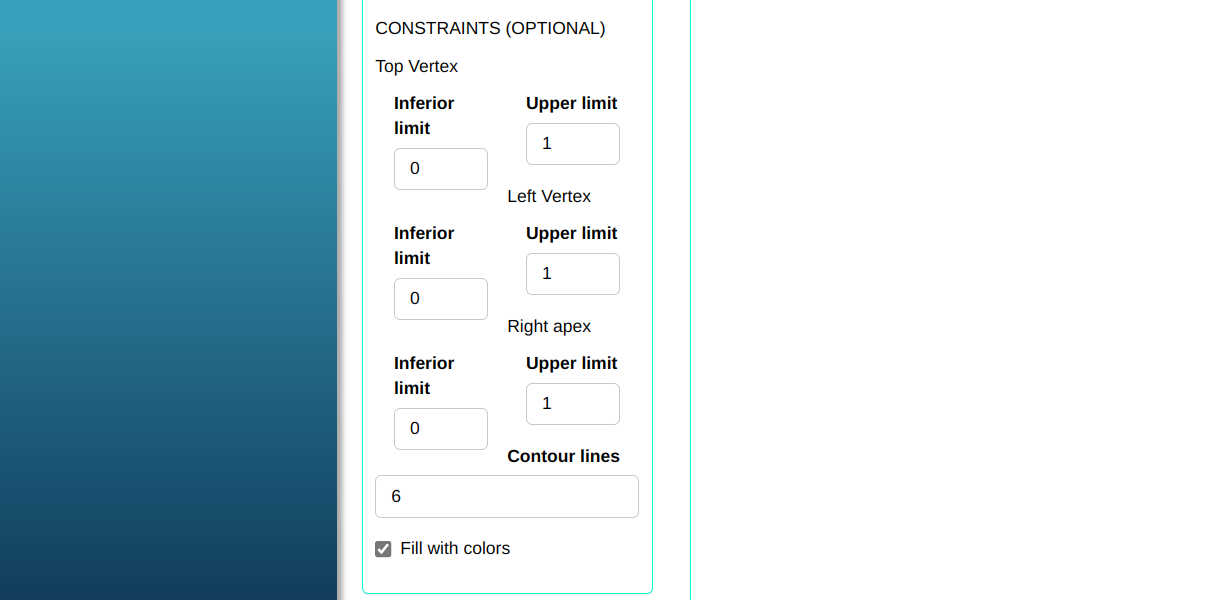
Clicking on Generate graph the graph will be generated.
Last modified 19.11.2025: Atualizar Manual (288ad71)